C++ / OpenGL / macOS
Setting up OpenGL development on MacOS with C++ and CMake
not as easy at it seems
today I want to start learning graphic programming.
Almost every tutorial that I can found is setting it up using Visual Studio in Windows. While my usual development environment is on my Mac.
Well it kinda make sense though, because somehow Apple is deprecating OpenGL in favor of their Graphic API, Metal. (not really surprised, just Apple being Apple)
I tried to setup a development flow in my windows laptop. but oh god, I just cannot be productive at all. it is not the OS fault. it is more of I have customize a lot of my mac to suite my need. just one example is I haven’t installed tiling window manager in windows, and my keyboard remap is not there! so.. I give up.
Fortunately, Apple is not completely deprecating the OpenGL, it is only that they are not supporting newer OpenGL versions (which I believe currently it is 4.6) but I still can use older OpenGL version which actually already pre installed in MacOS.
since currently I am on the learning phase, so I think it still fine to use older version.
now lets set it up.
Install GLFW
brew install glfwProject layout
opengl-macos-cmake/
├─ CMakeLists.txt
├─ external/
│  └─ glad/
│     ├─ include/
│     │  └─ glad/…         # headers (you’ll paste here)
│     └─ src/
│        └─ glad.c         # single C source (you’ll paste here)
└─ src/
   └─ main.cpp
Get Glad Files
first visit https://glad.dav1d.de/
and then make sure the setup looks like below
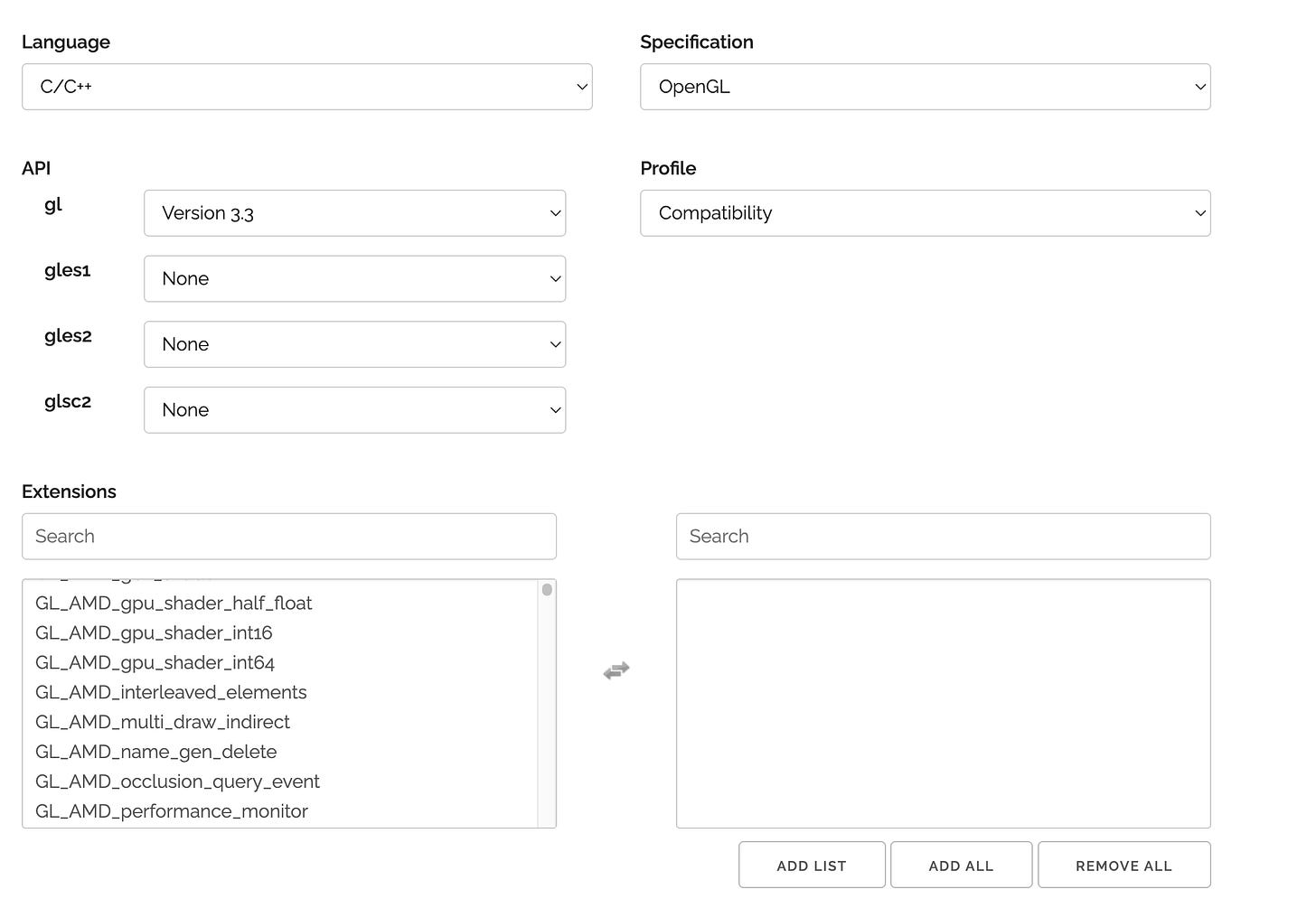
and then click generate on the bottom.
after that we download the glad.zip file, and then extract it and place files like below
-
copy include/glad/ to project external/glad/include/glad/
-
copy src/glad.c to project external/glad/src/glad.c
CMakeList file
cmake_minimum_required(VERSION 3.20)
project(opengl_glfw_macos LANGUAGES C CXX)

set(CMAKE_CXX_STANDARD 17)
set(CMAKE_CXX_STANDARD_REQUIRED ON)
set(CMAKE_EXPORT_COMPILE_COMMANDS ON)

# If you use Apple Silicon, this is usually detected automatically.
# You can force a build arch if needed:
# set(CMAKE_OSX_ARCHITECTURES “arm64”)  # or “x86_64”

# Add GLAD (vendored)
add_library(glad vendor/glad/src/glad.c)
target_include_directories(glad PUBLIC vendor/glad/include)

# Find GLFW installed via Homebrew
# brew installs a CMake config, so this should work:
find_package(glfw3 REQUIRED)

# OpenGL on macOS
find_package(OpenGL REQUIRED)

add_executable(app src/main.cpp)

target_link_libraries(app
  PRIVATE
    glad
    glfw
    OpenGL::GL
    “-framework Cocoa”
    “-framework IOKit”
    “-framework CoreVideo”
)

# Nice warnings
if (CMAKE_CXX_COMPILER_ID MATCHES “Clang|AppleClang|GNU”)
  target_compile_options(app PRIVATE -Wall -Wextra -Wpedantic)
endif()
Main.cpp file
// clang-format off
#include <glad/glad.h>
#include <GLFW/glfw3.h>
// clang-format on
#include <iostream>

static void framebufferSizeCallback(GLFWwindow *window, int width, int height) {
  glViewport(0, 0, width, height);
}

static void glfw_error(int code, const char *desc) {
  std::cerr << “GLFW error “ << code << “: “ << desc << “\n”;
}

int main() {
  glfwSetErrorCallback(glfw_error);
  if (!glfwInit()) {
    std::cerr << “Failed to init GLFW \n”;
    return -1;
  }

  glfwWindowHint(GLFW_CLIENT_API, GLFW_OPENGL_API);

  glfwWindowHint(GLFW_CONTEXT_VERSION_MAJOR, 3);
  glfwWindowHint(GLFW_CONTEXT_VERSION_MINOR, 3);
  glfwWindowHint(GLFW_OPENGL_PROFILE, GLFW_OPENGL_CORE_PROFILE);

#ifdef __APPLE__
  glfwWindowHint(GLFW_OPENGL_FORWARD_COMPAT, GL_TRUE);
#endif
  GLFWwindow *window = glfwCreateWindow(800, 600, “MyOpenGL”, nullptr, nullptr);
  if (!window) {
    std::cerr << “Failed to create GLFW window \n”;
    glfwTerminate();
    return -1;
  }

  glfwMakeContextCurrent(window);

  if (!gladLoadGLLoader((GLADloadproc)glfwGetProcAddress)) {
    std::cerr << “Failed to initialize GLAD\n”;
    return -1;
  }

  int fbW, fbH;
  glfwGetFramebufferSize(window, &fbW, &fbH);
  glViewport(0, 0, fbW, fbH);
  glfwSetFramebufferSizeCallback(window, framebufferSizeCallback);

  while (!glfwWindowShouldClose(window)) {
    glClearColor(0.1f, 0.12f, 0.15f, 1.0f);
    glClear(GL_COLOR_BUFFER_BIT);
    glfwSwapBuffers(window);
    glfwPollEvents();
  }

  glfwDestroyWindow(window);
  glfwTerminate();
}
Configure and build
# Configure (Unix Makefiles)
cmake -S . -B build

# Or generate an Xcode project if you prefer
# cmake -S . -B build -G Xcode

# Build
cmake --build build --config Release

# Run (Makefiles)
./build/app
Some Notes
now we should be able to run it.
you might notice
#ifdef __APPLE__
  glfwWindowHint(GLFW_OPENGL_FORWARD_COMPAT, GL_TRUE);
#endif
this is actually to make sure to instruct the driver to remove all deprecated functionality from opengl.
also this
set(CMAKE_EXPORT_COMPILE_COMMANDS ON)line is to make sure it create a compile_commands.json file, I am not sure myself but it helps our code editor. before outputing the file, I have linter error in my neovim. but after outputing the file and run
ln -s build/compile_commands.json .the llinter error is now gone. I think it helps clangd (the C++ lsp) to link for our vendor/included files correctly.
Well this is sure a lot for just popping up a window that not even doing anything. I guess this is a C++ experience!